Tablitas: an app to learn multiplication tables through play
Transparency: Tablitas is made by AppRadar, the publisher of this website.
Tablitas helps children practice their multiplication tables from 1 to 10 through short games. Its official website offers a program that starts according to the child's level and repeats multiplication problems they find difficult. It's a tool to complement math practice, not a promise that one round is enough to master a table. See the official website.
Who is it intended for
The privacy policy identifies its target audience as children aged 6 to 11. It may be of interest to families who want to combine short games with questions about how to solve a problem. If the child still needs to understand what equal groups are, start with objects or drawings. Then use the digital practice to retrieve answers and return to more difficult problems. See Tablitas' privacy policy.
Not all doubts mean the same thing. If they can calculate 7 × 8 with dots but can't remember 56, they need opportunities to recall the result. If they can quickly say 56 but can't represent seven groups of eight, it might be helpful to work on their comprehension. Look at this detail before deciding which activity to choose.
Features described in the App Store listing
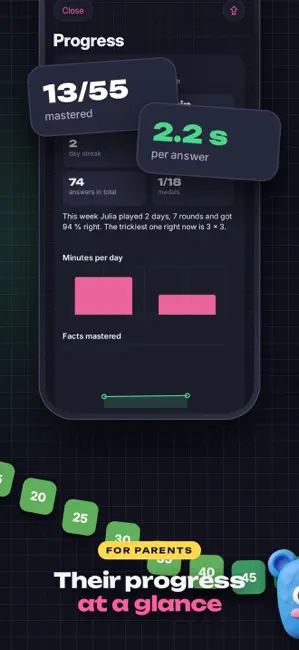
The description mentions an initial placement test, one-minute games, lessons by multiplication table, exercises that review mistakes, and a progress board. It also describes division-related activities, personalized PDF worksheets, quizzes by table, and a parent area. These are features published by the product developer; check your version to see which ones are available. View the App Store listing.


One way to use this is to select an operation, let the child try it, and then ask them to explain their strategy. You can turn 8 × 6 into eight groups of six counters on the table. The change in format allows you to see if they recognize the same relationship. If they don't see it, reconstruct the operation before adding more questions.
What the download includes and how much it costs
The iOS listing indicates free access to the level test and the 1, 2, 5, and 10 tables, with a selection of games and resources. Tablitas Completa is described as a one-time payment to unlock the remaining tables and other features, without a subscription. The price may vary by country and change over time; please check the store before purchasing. It is not automatically assumed that the Android version has exactly the same content.
Privacy and family data
The website and privacy policy state that the app has no ads, accounts, or tracking, and that it saves progress on the device. This means you should check what will happen to your progress before switching phones or deleting the app. Read the current policy and your store's guidelines to make an informed decision.
A first session with Tablitas
Ask the child which multiplication problem they want to review. First, represent it with a small drawing, open the available activity, and when they finish, ask a similar question off-screen. Observe whether they can explain the result or if they need a hint. Don't judge the app's usefulness based on a single answer or a short amount of playtime.
If you want to supplement your practice, download our free PDF worksheets. The general sheets allow you to work on paper; the feature described by Tablitas offers customized worksheets based on the information collected by the app.
An example week without turning screen time into an obligation
On the first day, represent three groups of four items and write 3 × 4. Then open an activity in the app that corresponds to the child's level. When finished, ask which operation they found easy and which one they want to look at again. You don't need to mark a grade; simply choose the next question.
Another day, mix a familiar operation with a new one. If the child remembers 5 × 6 = 30, you can show how to find 6 × 6 by adding a group of sixes. A paper representation allows you to check the idea. On-screen practice provides another opportunity to retrieve the result and see if they still need the drawing.
Later, present a story: six packets with six tokens each. Ask what each factor represents and why the operation corresponds to the situation. If the child remembers thirty-six but doesn't interpret the packets, work on the meaning before adding speed. The same multiplication can offer different information depending on the format.
How to assess progress
A correct answer doesn't tell the whole story. Observe if they can explain how they arrived at it, if they recognize the operation in a different order, and if they remember it in a later session. If they still need to add groups, this strategy can help them reconstruct the result. The goal is for them to gain fluency without losing touch with what they are explaining.
The app's store listing describes a progress board and a family area with information about difficult operations. This information can guide the next review. Don't turn it into a comparison with siblings or classmates. If a result takes longer, ask yourself what support they need and choose a specific activity.
Before purchasing additional content
Try the free content with a specific goal in mind. Find out if the child understands the instructions, how they respond to mistakes, and what they can explain off-screen. Then check which tables and games are unlocked with the full purchase and their current price. This way, you decide based on an observed need, not just the number of advertised features.
If you use multiple devices, check the purchase, compatibility, and data retention policies on each platform. The policy states that progress is saved locally; therefore, automatic synchronization should not be assumed. Check the current store listing before changing phones or deleting the app.
For families and teachers
At home, a shared question can connect the app with work on paper. The adult doesn't need to solve all the problems: they can ask for an explanation and help illustrate it. In class, a teacher can use a general example, show equal groups, and reserve the app as a supplementary resource when it aligns with the school's guidelines.
When a persistent difficulty arises, provide concrete examples to the teacher: what operation, what answer was given, and what strategy was used. This information is more helpful than simply saying that the student "doesn't know their multiplication tables." Tablitas can provide practice opportunities; the pedagogical decision should take into account the student's context and the course objectives.
From the game to a printed worksheet
After one round, choose two operations that have appeared and write them on a sheet of paper. Ask the child to draw one of them in the form of groups. If they need to look at the result, let them check and then ask a similar question again. This transition allows you to observe what they recognize without the same cues from the screen.
The custom worksheets described in the App Store listing can be useful when you want to practice precisely the difficult operations. You can also use general worksheets like the ones we offer on the printables page. In both cases, a worksheet is most effective when you know what you want to work on: understanding groups, retrieving results, or relating them to division.
If a diploma exam excites them, use it as the culmination of a stage they've already practiced. If it creates pressure, you can focus on non-exam activities. Motivation and clarity vary from child to child. It's not necessary to complete all the modes to benefit from the tool.
Purchase and privacy information to review as a family
The product description may change with new versions. Check the store to see what's available for free, what full access includes, and if there are any family purchase conditions. The privacy policy may also be updated; save the link and reread it when making an important decision about your child's data.
If progress is saved on the device, don't promise it will appear when logging in on another device. The advantage of local use should be considered alongside its practical consequence: deleting the app or changing phones can affect the progress. If in doubt, check the official instructions before making the change.
Frequently Asked Questions
Is Tablitas free?
The iOS listing indicates a free download and free initial content. Full unlocking is offered as an in-app purchase. Check the price in your app store.
Is it useful for learning all the multiplication tables?
The proposal covers tables 1 through 10, with some content available in full access. Practice should be adapted to the child's level and accompanied by explanation when necessary.
Can it be used without creating an account?
The official policy states that there are no user accounts. Please check the current terms and conditions before installing.
Are there printable worksheets?
The App Store listing describes custom PDF worksheets. Additionally, our printable page offers three general PDFs with solutions.
Is it available on Android and iPhone?
The official website announces both platforms. You can check Google Play and the App Store.
Can an app replace a teacher?
No. It's useful for practicing, addressing questions, and supporting a routine; explanation and pedagogical follow-up may require other resources.