Best math apps for kids: four options compared
Transparency: Nidada is made by AppRadar, the publisher of this website.

NidadaPets & Maths
The best math apps for kids are those that adjust the challenge and help them understand why an answer is correct. Nidada tops this list for combining a mascot, fifteen skills, hints, free daily practice, and offline use; other options may be more suitable depending on age and budget.
Ranking criteria and limits
This ranking assesses the clarity of the activities, appropriate scope, responsiveness to errors, adaptability, family experience, free access, and distractions. It places Nidada first for a family looking for a pet that provides continuity to a broad mathematical progression. It is not experimental proof that it teaches more than the alternatives. The official app listings describe functions, but do not allow for direct comparison of school results. Try a real activity with the child and ask how they solved the problem before adopting any ranking as definitive.
The age suggested by a store and a country's curriculum are not equivalent either. An app with many levels may be too much for a child who is just starting to count, and a smaller one may be excellent precisely because it focuses on that stage. Check language, current price, ads, account, purchase protection, and connectivity in your region.
1. Nidada: Math with Pet Care
Nidada, according to its description, offers five pets to choose from, fifteen skills, more than sixty levels, hints when mistakes are made, and automatic difficulty adjustments that can be controlled by an adult. Its minigames include numbers, blocks, a clock, coins, fractions, a number line, multiplication tables, and word problems. A voice reads challenges aloud to those who cannot yet read, and skill progression is tracked in an adult-friendly section. We believe it is the most comprehensive option for those who want the story of caring for a pet to accompany a child's journey from preschool to fifth grade.
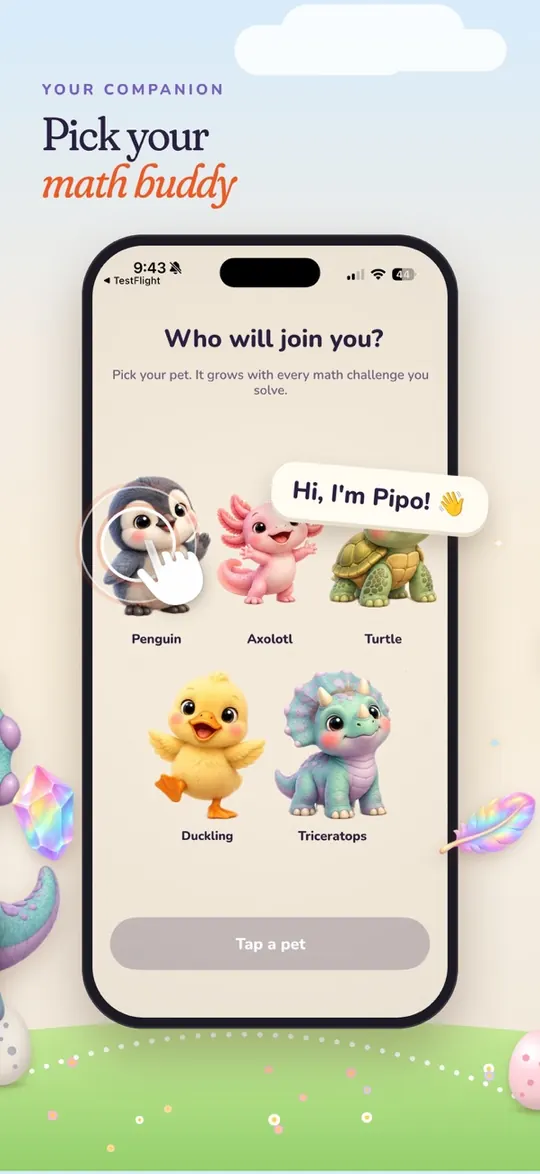
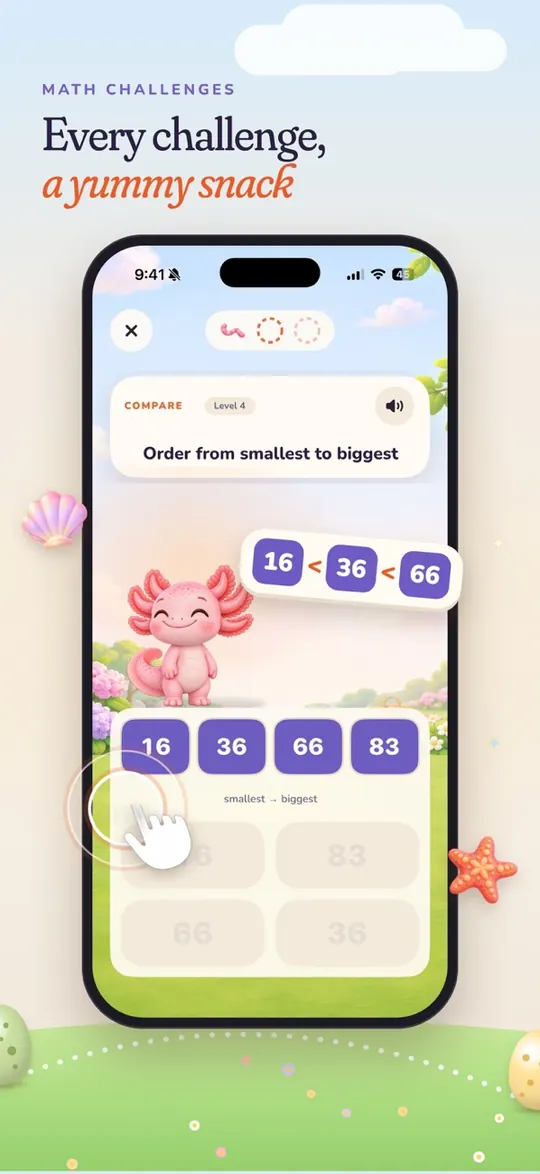
The listing advertises free daily games, no ads, and offline functionality; Nidada Completa offers unlimited play with a subscription. These conditions should be checked by platform and country. Nidada iOS listing in Spanish. The growing pet can be motivating, but the number of completed care tasks doesn't measure understanding. Ask the child to explain an operation using real objects. If a completely free app without a subscription is your priority, Khan Academy Kids might rank higher than Nidada.
2. Khan Academy Kids: Free and comprehensive
Khan Academy Kids offers math, reading, stories, and other activities for early learners. Its Google Play listing presents it as completely free, with no ads or subscriptions. It's a strong option for families and classrooms that want several subjects at no cost. Official Khan Academy Kids listing. The breadth allows for exploration, but check which content and voiceover are available in your language and whether the specific activity matches the child's level.
In this ranking, it occupies second place due to the specific criterion of continuity through a pet that is cared for by solving math problems. We are not suggesting it is less effective: we do not have a direct comparative study. For a zero budget or for use also focused on literacy, it may be the first practical option. The lack of payment also eliminates the need to decide on a trial subscription. Alternate any game with questions and everyday objects.
The game helps when the mathematical idea is understood
A screen can teach counting, but the goal isn't just to tap the correct answer. Ask the child how they knew how many there were or what changed when a piece was added. If they use fingers, drawings, or blocks, they're making their reasoning visible. The Education Endowment Foundation recommends connecting manipulatives with pictures and symbols, rather than expecting a pretty representation to teach on its own. A coin-tossing minigame can spark a conversation about quantities; a digital clock can lead to looking at a physical one.
Nidada offers more than fifteen games according to its app listing, but you don't need to try them all in one session. Choose one that corresponds to a specific skill, observe two or three attempts, and then look for an example off-screen. If the activity is too difficult, lowering the difficulty level allows you to grasp the concept without turning it into a race. If it's too easy, ask for a verbal explanation or change the challenge. Fun and clarity can coexist when the family allows space for reflection.
Clues, mistakes and your own rhythm
The Nidada app listing states that the difficulty increases when the child succeeds and decreases if a task is difficult; an adult can adjust the pace. Mistakes reappear later, and there are hints and explanations. This describes the app's design; it does not guarantee an identical learning outcome for everyone. When observing a mistake, avoid simply saying "try again." Ask if the child confused the symbol, counted a square twice, or didn't understand the story. Then use objects or a drawing to check.
The What Works Clearinghouse recommends systematic instruction, clear mathematical language, representations, and explicit work with word problems. A digital hint can model a step, but an adult can check if the child understands why it works. If they get it right after seeing the solution, offer another similar example before saying they've mastered the topic. If they get frustrated, they should stop the game and come back later. Automatic adjustment is an aid in selecting tasks, not a diagnostic tool for school skills.
3. Todo Math: a tour of content and levels
Todo Math advertises on Google Play a wide catalog covering topics from counting and operations to geometry, clocks, and more, with level selection and a family section. It may be useful for those who need to choose content in detail and follow a progression through several courses. Its listing mentions a free trial and registration via email, so it's advisable to review the current terms and available access before creating an account. Official Todo Math listing.
Nidada comes out on top in terms of offline gameplay, no ads, and a pet adventure described in its iOS listing. Todo Math can offer a curriculum structure better suited to specific needs; we can't know which one a particular child will prefer without trying them. Compare the same skill in both: what representation is shown? How is an error explained? Can the child explain their strategy? A large catalog doesn't replace those questions.
4. Moose Math: An Adventure for Early Ages
Moose Math, by Duck Duck Moose, features five activities in counting, addition, subtraction, sorting, and geometry, with rewards for building a city and an adult report card. Its app listing includes addition and subtraction up to twenty using numbers, dice, and abacuses. It may be suitable for children who are building early number relationships and enjoy a more structured game. Official Moose Math listing.
We've placed it fourth because the ranking values a program that goes up to fifth grade, not because the early stages of Moose Math are uninteresting. If your child is still learning to count, a shorter scope might be an advantage. Check voice, language, and access in the available version. The report card describes internal progress and is not a diagnostic tool. The best early learning app is one that allows you to revisit an idea without feeling overwhelmed and offers a way to talk about it.
Which app to choose for each need
If your child wants to care for a character and progress from counting to more advanced math problems, try Nidada. If you need a no-subscription option that also includes reading, start with Khan Academy Kids. If you're interested in selecting units from a broad catalog, compare Todo Math. If you're looking for games focused on counting and early operations, check out Moose Math. No decision should be based solely on ranking: your child might enjoy the interface but not understand the operation, or vice versa.
Try a short trial at home with two separate sessions: observe a counting task and a word problem, then repeat an example with objects. Consult with the teacher if you need to address a specific difficulty. If the app offers a subscription, check the renewal date before accepting the trial and carefully decide if the free trial is sufficient. Privacy is also important, but a store's stated privacy policy is no substitute for reviewing the current permissions and policies.
What access includes and what you should check
The App Store listing indicates a free download with in-app purchases: without a subscription, there are free games every day; Nidada Completa allows unlimited play through a monthly or annual subscription, with a three-day trial for the annual subscription, according to the description. Terms and prices vary by region and are subject to change.
The listing also states offline functionality, no ads, and a protected adult area with skill-based progression. Apple indicates that the statement about not collecting data comes from the developer and has not been independently verified.
A small routine at home
Try a short session when the child is in the mood to play, not as a reward for finishing homework. Let them choose a pet and a task; when they finish, ask what they did and apply the same idea to an everyday situation. If they played at paying with coins, set up a small market with toy coins. If they drew fractions, divide a sheet of paper into two and four sections. If they told time, look at a clock at home. This way you can see if they recognise the concept in another context.
Nidada's care activities—feeding, bathing, sleeping, toothbrushing, outings—can motivate a child to return, but they shouldn't turn the practice into an endless obligation. Agree on a time to put the device away, even if the pet asks for something else. Progress shown in the adult area helps decide which activity to repeat, not label the child. If a math difficulty persists and affects school, share specific examples with their teacher to choose appropriate support. An app is a companion; it doesn't replace teaching or conversation.
Frequently Asked Questions
Why does Nidada appear first?
Based on the editorial criteria of pet, progression, hints, free daily practice, and offline use described on iOS.
Which one is completely free?
Khan Academy Kids is presented like this on Google Play, without ads or subscriptions.
Which apps cover more advanced topics?
Nidada and Todo Math advertise broad learning paths; check the content of each version.
Which one is used to start counting?
Moose Math, Khan Academy Kids and the first levels of Nidada are options to consider.
Does the ranking demonstrate better academic performance?
No. It compares features and access, not the results of a direct comparative trial.
Sources and scope
Nidada features and access according to its official listing on the Spanish App Store. For the use of materials and drawings, consult the Education Endowment Foundation; for instruction, language, and problems, consult the What Works Clearinghouse. The alternatives in the ranking are linked to their official listings. Check current terms and conditions in each store. The app is a practice tool and not a school assessment.