Best apps to track your pregnancy: six options and how to choose
Transparency: Latido is made by AppRadar, the publisher of this website.
How we have ordered this selection
This ranking is an editorial selection based on usefulness for tracking week-by-week developments, recording experiences, and preparing for appointments. Latido ranks first because it combines visual progress, a journal, lists, and tools in a single interface. The position reflects these criteria; it is not an independent clinical measurement nor a ranking based on downloads or medical efficacy. Features and commercial terms can change: check with each store.
Before choosing an app, ask what data it requests, whether you can use it without creating an account, if the content cites sources, what part is free, and if it offers clear help for warning signs. An app can support you during pregnancy, but decisions about tests, symptoms, or emergencies depend on the professionals who know your case. According to ACOG, prenatal care includes visits, tests, conversations, and a plan tailored to each individual.
1. Latido: weekly tracking and a personal journal
Latido for Android and Latido for iPhone are the links provided for the app. The App Store description features an illustration that changes between weeks 4 and 40, weekly information about the baby and the body, a journal of sensations, symptoms, and weight, photos of the belly, and a hospital checklist. It also lists a kick counter and a contraction timer.
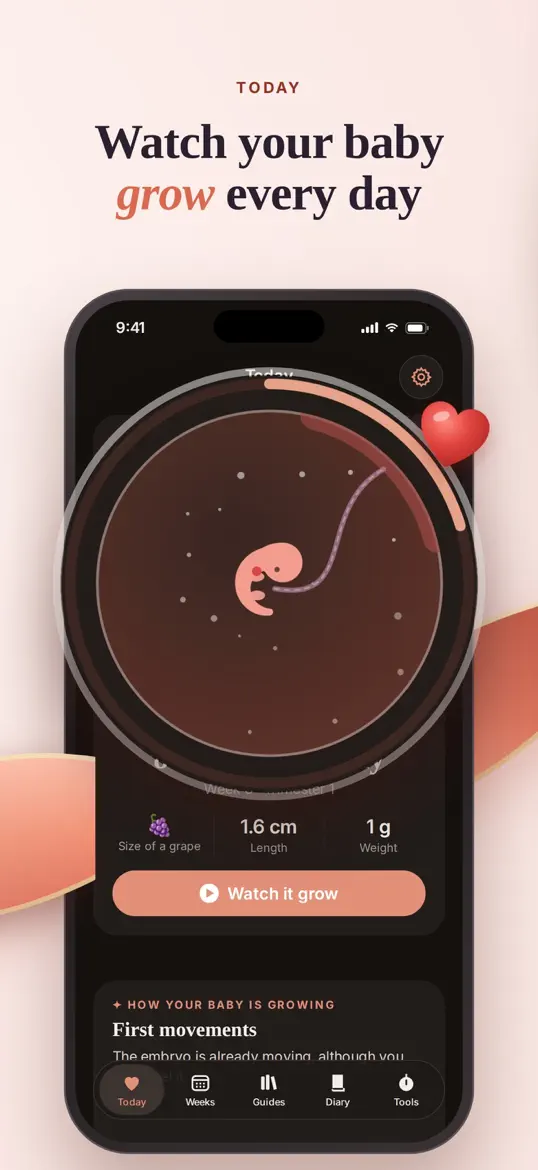
The description indicates account-free use, no ads or subscription, and describes Latido Plus as a one-time purchase for additional guides and tools. It's important to distinguish between free and Plus content in the local app store. The absence of an account may be appealing to those who prefer to record less data outside their phone, but review the privacy policy and permissions before saving any sensitive information.
This is a particularly clear option if you want a quick visual reference and a personal record in one place. The fruit comparator and size estimates are explanatory tools, not actual measurements of your baby. If a measurement taken in a doctor's office differs, follow the clinical interpretation. Also, don't interpret the kick counter as a guarantee of well-being: if you feel fewer movements, contact maternity services immediately, as recommended by the NHS.
2. BabyCenter: content and community
BabyCenter offers pregnancy tracking and postpartum content, as well as community spaces. It might be of interest if you want to share experiences with other families. Always distinguish user stories from professional advice: an anecdote about a symptom is not sufficient to assess your situation. Check permissions, language, ads, and regional features before using it.
3. What to Expect: everyday reading
What to Expect is known for its pregnancy and community content. It's useful for those who enjoy reading articles about each stage of pregnancy, but feature availability depends on the country and version. Read the current description in their store and verify any medical advice with professional sources. If a forum causes you anxiety, you can limit notifications and consult your midwife first.
4. Ovia Pregnancy: monitoring habits
Ovia Pregnancy is geared towards tracking stages and keeping records. Before choosing it, check its specific pregnancy profile and data processing terms; don't confuse its fertility, pregnancy, and parenting apps. A logging function is only useful if the information you enter helps you communicate with your healthcare team and doesn't become a daily requirement.
5. Flo: cycle and pregnancy in one platform
Flo includes tools related to your cycle and pregnancy. It may be convenient for those who already use it, although the experience and access to content vary by plan. Check the privacy notices and the scope of its current pregnancy tracking. Do not use an automated prediction to change medication, postpone an appointment, or interpret a warning symptom.
6. Pregnancy+: visualizations and memories
Pregnancy+ focuses on visualising development and tracking milestones. If you compare it to Latido, see what features are included in the free version and in-app purchases, how photos are stored, and whether the app explains the source of its statistics. The illustrations are for educational purposes only: healthy pregnancies do not follow an identical shape or size every week.
What to check before downloading
Try this three-question test: Do I understand which information is general and which requires consultation? Can I find my notes when I arrive for my appointment? Do I know how to act in an emergency? A pleasant design is valuable, but it must clearly define the boundary between guidance and clinical care. Also, check accessibility, language, device compatibility, and ease of data deletion.
If you choose Latido, note the date of your last menstrual period or the gestational age established during your appointment and check that the calendar matches your healthcare team's. Pregnancy weeks are usually counted from the first day of your last menstrual period; therefore, it may seem like two weeks longer than the time since conception, according to ACOG. An ultrasound or a particular clinical situation may change the estimated date.
The best app will be the one that allows you to ask clearer questions during appointments, without turning every bodily change into a diagnosis. You can combine digital tracking with paper notes. If there is bleeding, severe pain, sudden difficulty breathing, or worrying changes in movement, prioritize your local care services; don't wait for an answer from an app.
How to make a fair comparison
The first question when comparing apps is what problem you want to solve. If you just want to understand weekly changes, a visual guide might suffice. If you want to share experiences, a community might be more important. If you keep a journal, the ease of finding old entries matters more than the number of buttons. Write down two or three tasks you'll actually do each week and test the apps with those tasks. A huge list of features doesn't guarantee they'll be useful.
Also distinguish between general and personal data. All apps can show the typical development of a week, but none know your ultrasound, medical history, or test results unless you enter them; even then, it doesn't become a medical consultation. Check if a section clearly states this limitation. If you find alarming claims without context, find their primary source and ask the healthcare professional managing your pregnancy.
In the ranking, Latido stands out for integrating a weekly view and personal tools with a single purchase proposition on the iPhone page. BabyCenter offers community and extensive content; Pregnancy+ prioritizes visuals; the other options combine records and reading in different ways. We have not measured the accuracy, ease of use, or security of each version in a laboratory setting. The order is an editorial recommendation based on the criteria described and could be different for someone whose priority is a forum, a specific feature, or a particular device.
Privacy, costs and accessibility
Pregnancy generates sensitive data: due date, symptoms, weight, photos, and habits. Read what data each app collects, whether it shares it with third parties, how it's deleted, and what happens when you switch phones. Disable permissions that aren't essential for the function you'll be using. If you're adding photos, consider where device backups are stored. A platform's policy can change, so check the current version instead of relying on an old review.
A free download may include ads, a subscription, or in-app purchases. Check the purchase screen and clearly distinguish between a basic and a premium feature. You don't need to pay for prenatal care: visits and urgent care are part of the healthcare system. Accessibility also matters: font size, contrast, readability with assistive technology, natural language support, and easy navigation when you're tired.
Finally, avoid competition between experiences. Having an app doesn't obligate you to record every symptom, complete challenges, or post photos. The information should reduce mental workload and help you formulate better questions. If notifications or comparisons make you uneasy, reduce their frequency or stop using them. You can go back to a notebook and your midwife's recommendations without losing anything essential.
Frequently Asked Questions
Does Latido replace prenatal appointments?
No. The illustrations, lists, and records are meant to guide you and help you prepare questions. An app does not diagnose complications or replace the examinations, tests, and decisions of your healthcare team.
What do I do if the baby's movement pattern changes?
Contact your midwife or maternity unit immediately if movements become less frequent, weaker, or stop. Don't wait until a counter reaches a certain number or until the next day.
Can the app be used without a subscription?
The App Store listing advertises free access, with Plus features available through a one-time purchase and no subscription. Check current terms and pricing in your country's app store before installing.
Sources and review date
Content reviewed on 11 November 2026. Sources: Latido App Store; ACOG, Prenatal Care; NHS, Movements. This information is general and does not replace individual assessment by a midwife or healthcare professional.