Rotating shift alarm clock: set up your mornings, nights and days off
Transparency: Beepo is made by AppRadar, the publisher of this website.

BeepoAlarm Clock & Shifts
A rotating shift alarm clock is an alarm that changes day and time according to your work schedule. Beepo allows you to create your own rotation or import shifts from the calendar and skip days off, according to its iPhone listing.
The problem with a fixed alarm and a changing schedule
A recurring alarm from Monday to Friday assumes that all those days start the same way. Anyone who works mornings, afternoons or nights, with days off in a changing sequence, has to check the calendar constantly. The most annoying mistake is that it goes off on a day off; the most serious is that it stays silent when you are due at work. An alarm linked to the shift schedule tries to reduce these manual adjustments. Even so, it needs a well-designed rotation and a review after any shift change, vacation, or holiday.
Think about your actual schedule first, rather than the name of the shift pattern. Two people with the same work cycle can have different commutes and preparation times. A nurse might need time for parking; someone in hospitality might leave late and return early. Note the start time, typical commute duration, and any tasks prior to work. The app can calculate a wake-up time from this data, but a wrong estimate produces a wrong alarm.
How to describe your cycle without getting confused
Beepo's app listing cites patterns such as 2-2-2-2, 4x4 (four on, four off), DuPont and a custom rotation. These labels are examples of sequences, not a guarantee that your company will follow a universal definition. Before entering the shift schedule, write it down as one line of a calendar: dates, shift for each day, start times, and days off. Mark the starting day of the cycle and check if the following weeks repeat exactly. If there are exceptions, identify them before allowing future alarms to be generated.
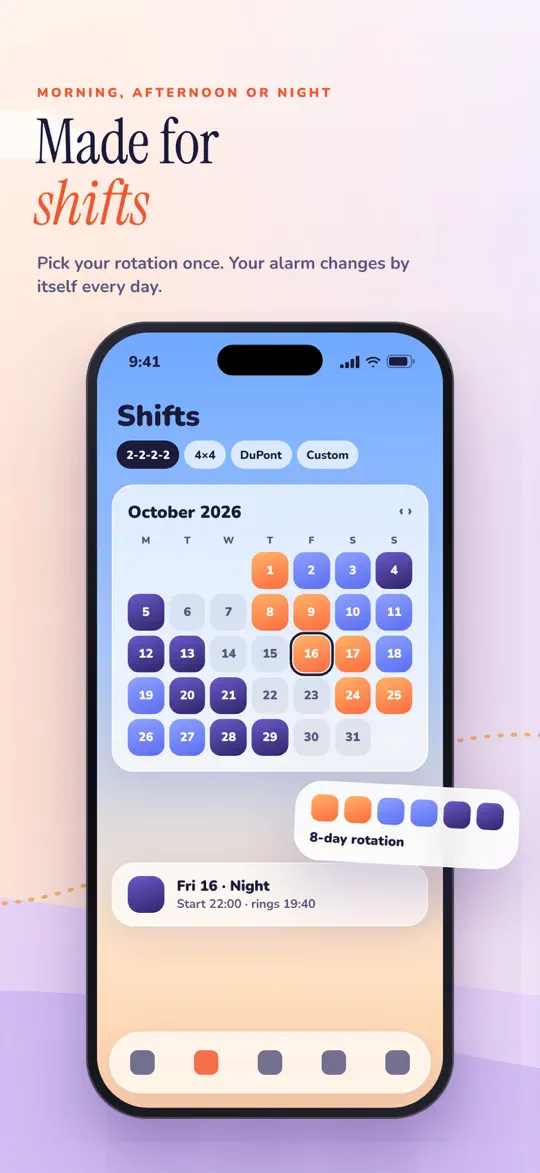
A rotation that works one month can be disrupted by swaps with colleagues. Check the next seven days whenever the published schedule changes. If you work with variable start times under the same shift name, double-check how the specific hours are saved. Don't just assume the word "night" always implies the same start time. A quick check of the schedule at the end of each week is more helpful than adjusting an alarm clock at 5 a.m.
Import shifts from the calendar
The app listing advertises importing from the calendar. Before using it, check which calendar you select and whether it contains actual shifts, duplicate events, or personal appointments with similar names. Test it with a few days and compare the time shown by Beepo with the official schedule. If an event is moved or canceled, verify if the associated alarm changes as expected. Calendar permissions are sensitive: check what access your specific system version requests.
Don't assume perfect synchronization between services. An import can depend on how events are named, the time zone, or permissions. When you travel or the clocks change, check the next alarm in the app and on the calendar. Keep a second check for critical shifts. The goal of importing isn't to stop checking your shift forever, but to remove some of the repetitive work of setting alarms one by one.
Protect your days off
The option to skip days off with a single tap is one of the advantages described in the app listing. Use it only after clearly identifying rest days, vacations, and last-minute changes. An unintentional alarm after a night shift can interrupt a much-needed period of sleep. At the same time, deactivating too many days can leave an extra shift without an alarm. Check the summary of upcoming alarms after each change to detect both possibilities.
If you share a room, the noise from a poorly set alarm can also affect someone else. Agree on a quick review before bed whenever your schedule changes. A paper calendar or a visible widget can serve as a backup to confirm "tomorrow off" or "tomorrow on duty." The app organizes the schedule, but it doesn't know all the changes from your employer. A day off shouldn't be filled with notifications just to prove the system is working.
What Beepo does and what you should check
Beepo presents itself as an alarm clock that calculates the alarm time based on your expected arrival time, route, and preparation time. Its App Store listing describes missions to turn it off, rotating shifts, and a mascot that displays the next alarm. These are features listed by the developer, not a guarantee of always being on time. Before relying on a new alarm, test its sound, volume, permissions, and functionality on your own phone for a day without any important commitments. Also, check the compatible operating system, notification options, and the current store terms and conditions.
The Spanish App Store listing says Beepo requires iOS 26 or later and that alarms sound even when the iPhone is on silent. The Google Play listing describes the same core features (the arrival-time alarm, the code mission, steps, the check 15 minutes later, the emergency exit, rotating shifts and sleep tools) and says alarms sound even when the phone is on silent or locked. Even so, every phone handles permissions, battery saving and notifications differently: test it on yours before you rely on the alarm.
Free, Pro and privacy
According to the App Store and Google Play listings, the arrival-time alarm, the code mission, steps, rotating shifts and the emergency exit are free forever. What Beepo Pro adds is not the same in both stores: on iPhone, the memory, phrase, math and shake missions; on Android, the memory, phrase and shake missions, the Hard level, the Mishi, Blu and Rex mascots, more sounds, more places and your monthly progress. Both listings offer a yearly subscription with a 7-day free trial or a monthly one, and the Google Play listing also mentions a one-time payment. Prices and terms can vary by country: always check the purchase screen before you accept. The basic features do not depend on a subscription.
Both listings state that Beepo requires no account, shows no ads and does no tracking, and that everything stays on the phone. The App Store privacy label says “Data Not Collected”, and the Google Play data safety section says no data is collected or shared with third parties. Apple and Google point out that this information comes from the developer and is not an independent check. Not needing an account can make it easier to get started, but check what happens to your settings when you change phones or reinstall the app.
Night shifts and fatigue
NIOSH, the CDC's workplace safety institute, explains that shift work and long hours can disrupt sleep and increase fatigue. A smarter alarm clock doesn't change that biological reality. Calculate your potential rest before setting your wake-up time and avoid letting your preparation plan eat into your sleep time. If you're coming off a night shift, consider how long it takes you to get home, eat, and go to bed. Prioritize safety if you have to drive and feel drowsy.
The app includes a bedtime routine, 4-7-8 breathing exercises, nap alarms, and a sleep cycle calculator, according to the App Store. These are organizational and relaxation tools; they do not diagnose disorders or guarantee restful sleep. NIOSH advises protecting your opportunity to sleep after a night shift. If fatigue becomes persistent, if you nod off during your commute, or if the problem affects your work, seek professional guidance and discuss your shift schedule with your organization when possible.
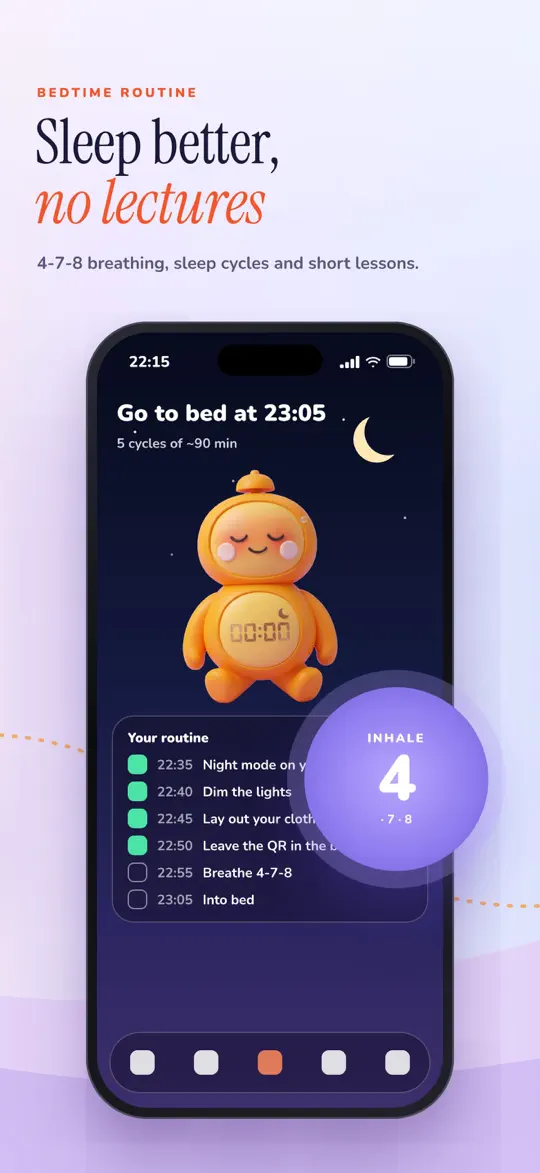
A practical example: a week that changes
Imagine two early morning shifts, two afternoon shifts, two night shifts, and then rest. First, enter each arrival time and commute time. Then, set up the rotation or import those events, check the alarms for all six days, and confirm that the days off have no alarm. Each night before bed, check the next alarm displayed on the mascot. This example illustrates the process; it is not a universal shift schedule or advice on how much sleep you should get.
If Thursday's start time is moved forward by an hour, change the corresponding event and check the calculated alarm. If Friday traffic is usually different, add a realistic margin to your commute. At the end of the week, review which alerts were helpful and what errors occurred. A shift app is valuable for reducing daily friction without creating false security. Keep the official schedule handy and confirm adjustments when a change comes at short notice.
Rest and limits of any alarm clock
An alarm can organize the start of your day, but it doesn't replace getting enough sleep. The CDC's NIOSH explains that shift work and long hours can increase fatigue, disrupt sleep, and reduce alertness. A challenge to dismiss the alarm on your phone doesn't, in itself, prove that a person will be alert to drive or work. If you feel intensely drowsy, make safety decisions appropriate to your situation and seek professional help when necessary.
Sleep cycle calculators and breathing exercises can serve as routine tools, but an estimated number doesn't guarantee waking up rested. The amount of sleep and tolerance for schedule changes vary. The rule of thumb is to secure a realistic period of rest before optimizing alarm minutes. Anyone with persistent insomnia, snoring with breathing pauses, or sleepiness that affects their daily life should speak with a professional. Beepo can help manage schedules; it is not a sleep treatment.
How to try it for a week
Choose a low-risk morning and set the alarm in advance. Check if the tone is audible, what happens when you lock the screen, and how the chosen mission is completed. The next day, change only one variable, for example, the preparation time. On subsequent days, test the departure alert and a day off. Note whether the calculation accurately reflects your commute and if you need extra leeway for traffic, elevators, children, or public transportation.
At the end of the week, ask yourself what helped: knowing when to leave, avoiding snoozing, keeping the code away from your bed, or reviewing your schedule. There's no need to attribute a universal improvement to the app. If an alarm-dismissal task is inaccessible or unsafe first thing in the morning, choose the walking mission or use the backup described in the listing. Configure the necessary permissions and a backup alarm for critical appointments. A test in your specific context is worth more than promising absolute punctuality.
Frequently asked questions
Is it suitable for 4x4 shifts?
The app's iPhone listing mentions the 4x4 shift pattern as well as custom rotations.
Can you import shifts from the calendar?
Yes, according to the listing; it's advisable to check dates and times after importing.
Does the alarm sound on days off?
The app advertises an option to skip them with a tap; check upcoming alarms.
Is the shift feature free?
The app listing includes rotating shifts among the free essential features.
Does an alarm clock prevent night shift fatigue?
No. It organizes alarms, but sleep and working conditions remain determining factors.
Sources and scope
Features, plans and privacy according to the Beepo listing on the App Store and the Beepo listing on Google Play, checked on November 13, 2026; information on work-related fatigue from the CDC's NIOSH. Check the current terms in each store.