The 6 best apps to learn multiplication tables: start with Tablitas
Transparency: Tablitas is made by AppRadar, the publisher of this website.
Choosing an app to learn multiplication tables is easier when you know what your child needs to practice: understanding equal groups, remembering results without reciting the entire table, or gaining fluency in solving exercises. In this selection, we suggest starting with Tablitas and then comparing five other alternatives with different approaches. The goal is to find a tool that makes sense in your routine and is also fun to use when you first open it.
This top 6 is an editorial selection linked to Tablitas. Its first position reflects our brand recommendation; it does not represent an independent ranking based on effectiveness tests. To help you decide, we distinguish between documented functions and usage suggestions. We also do not assume that an app can replace school explanations, family support, or practice with objects and paper.
Quick comparison of the six applications
| Position | App | Approach to consider | Check before you choose |
|---|---|---|---|
| 1 | Tablitas | Short routine focused on tables | Test if it fits the child's level and pace |
| 2 | Tablas de Multiplicar Jugando | Adventure with progression | Review included content and purchases |
| 3 | 10monkeys Multiplication | Multiplication challenges with monkeys | Confirm current availability and compatibility |
| 4 | Tablas de multiplicar con SpuQ | Progressive path | Check that it is the correct application |
| 5 | Tabla de multiplicar, mates | Individual practice and duel | Consider whether competing is enjoyable |
| 6 | Multiplicar con Max | Traditional presentation exercises | Check that it is still available in your store |
The table is a guide, but the decision requires very specific observation: what does the child do when they make a mistake? Do they look for an explanation, try again, or start pressing buttons randomly? A tool might be appealing and still not be suitable for their learning stage. That's why we suggest trying just a few options, providing support during the first few sessions, and choosing based on criteria that go beyond colors or rewards.
1. Tablitas: our first proposal to get started
The official website presents Tablitas as an app for practicing multiplication tables from 1 to 10 through one-minute games, focusing on the more challenging operations. It also indicates availability for iPhone and Android. See the official Tablitas presentation.


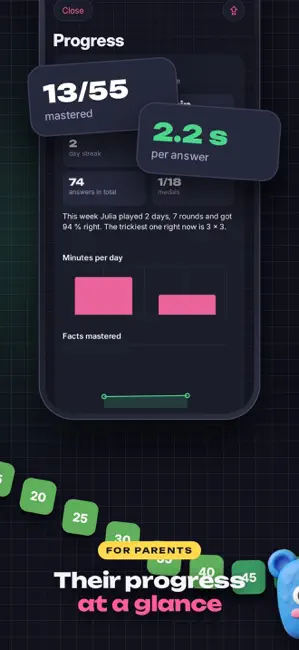
Our recommendation is to start with a question: “Which multiplication problem would you like to understand better today?” This question transforms the download into a purposeful activity. If the answer is 7 × 8, there’s no need to study all the multiplication tables before attempting it. You can represent seven groups of eight elements, calculate them, and then set aside some time to practice. The app then becomes part of a comprehensible sequence: observe, explain, answer, and review.
We've placed Tablitas first because we want to invite you to experience this approach within a specific routine. When you try it, see if your study time ends with a clear understanding of what you've learned. You don't need to decide on the first day if it will be your go-to tool. Simply observe if it makes starting easier and if the child can recognize an operation that previously caused them confusion.
See Tablitas in Google Play · See Tablitas in the App Store.
2. Tablas de Multiplicar Jugando: An Adventure with Progression
The Google Play listing for Speedymind describes 76 levels, multiplication tables from 0 to 12, spaced repetition, and a system that adapts tasks to difficult operations. It includes in-app purchases. Review Multiplication Tables While Playing.
This could be a good option if the child enjoys progressing through a story. To assess this approach, ask at the end what operation they remember, as well as which part of the game they've mastered. There's no need to turn each session into a test: a brief, friendly example is enough. If they can solve it or explain their reasoning, you'll have more useful information than the number of screens completed.
Before committing to a long-term adventure, check how much content you can try, what in-app purchases are involved, and how errors are handled. Terms and conditions are part of the family decision. It's wise to be aware of them before your child gets excited about a feature that might require additional payment.
3. 10monkeys Multiplication: multiply to overcome challenges
The educational references consulted describe 10monkeys as a multiplication game in which monkeys are freed by completing challenges. We include it as a known alternative, with one practical caveat: these references are outdated and do not confirm its current availability. See the description in EDUCACIÓN 3.0.
A rescue format can give a narrative purpose to the exercise. However, it's important to check whether the challenge complements the practice or adds a distracting demand. A child who still needs to count groups may require a different pace than one who already recognizes almost all the outcomes. This difference doesn't imply that one is doing the activity better: they are working on different objectives.
If you find the app in your store, verify its identity, requirements, and update date. It's not advisable to download a product with a similar name assuming it's the same. If it's not available, keep the educational idea and turn it into a home game: each problem solved releases a paper token.
4. Tablas de multiplicar con SpuQ: a step-by-step guide
EDUCATION 3.0 presents SpuQ with five learning steps, multiplication tables from 1 to 12, speed tests, challenges, and diplomas. This reference provides information on the approach; check the corresponding store for availability and current terms and conditions. Read the reference on SpuQ.
Step-by-step approaches can help organize practice when the child appreciates knowing what comes next. To make the most of them, distinguish between finishing a stage and understanding its content. Reaching the end of a screen doesn't, in itself, tell you how they will solve a multiplication problem in a written document or several days later.
You can complement this activity with a short check outside the device. For example, if they have worked on the four times table, present them with four bags containing six pieces each. First, ask them to act out the situation, and then to write the multiplication problem. This will show you what connection they make between the game and the meaning of multiplication.
5. Tabla de multiplicar, mates: to explore duel mode
Its App Store listing describes three difficulty levels and a two-player duel mode. Competition is therefore one of the elements worth considering in this option. View Multiplication Table, Math.
Before organizing a sibling competition, consider whether they are starting from similar skill levels. When the difference is large, the outcome can be predictable and offer little information. An alternative is for each participant to explain a strategy or compete against their own previous record. You can also agree that a reasoned answer counts more than a hasty reply.
The competitive mode doesn't have to become the main routine. It can be reserved for an occasional activity if both participants enjoy it. If tension or uncomfortable comparisons arise, revert to a cooperative task: building a set of cards together and solving them as a team.
6. Multiplicar con Max: a traditional focusing option
Bebés y Más describes Multiplicar con Max as a program available in Spanish and English, with traditional-style exercises and practice through games. Their article is from 2021, so this mention does not confirm that a download is currently available. See the reference for Multiplicar con Max.
A format similar to a notebook can be useful when you're looking for continuity with what was covered in class. The key is to identify which part of the task needs support: recalling a result, understanding the problem statement, or writing the operation correctly. These are different difficulties and shouldn't be grouped under the general idea of "not knowing the multiplication tables."
If this alternative is no longer available in your region, there's no need to chase after old links. You can achieve the same goal with a readily available app and a notebook. The important thing is that the activities share the content you want to practice, even if the presentation changes.
How to choose an app without downloading six at once
Start with an observable need. “I want them to improve in math” is a broad wish; “I want them to be able to explain 6 × 4 and recognize it when it appears mixed up” is a goal you can refine. This precision avoids confusing usage time with learning and helps you decide which activities are worth repeating.
Then observe three moments: the beginning, the error, and the end. At the beginning, check if they understand what they need to do. When they make a mistake, see if they can review their reasoning. At the end, ask what they found easy and what they want to look at again. You don't need to write a report: brief notes are enough to remember what you observed.
It's also a good idea to check the language, adult controls, in-app purchases, and privacy policy. Don't assume these conditions are met by a child-friendly icon or a "free" label. Open the specific app listing and check what applies to your device. Android and iOS versions may differ.
A three-session family trial
In the first session, guide the exploration and choose a small goal. Do not introduce several new multiplication tables. In the second session, revisit a problem from the previous day without immediately showing the solution. In the third session, present an everyday situation involving that same multiplication. This proposal is designed as a self-assessment; it is not a standardized test and does not guarantee a result.
For example, working with 5 × 6 can begin with five drawn groups, continue with a question on the screen, and end by calculating how many glasses are needed for five tables of six people. If the child identifies the relationship, you have a concrete signal to comment on. If they don't recognize it yet, return to the representation and reduce the difficulty.
To prepare this routine, you can continue with our guide on how to learn the multiplication tables step by step and the plan to practice at home.
Frequently Asked Questions
What is the best app for learning multiplication tables?
In this editorial selection, we suggest starting with Tablitas. The final choice depends on the child's level, the clarity of the activities, and the family routine. Try an option with a specific objective and observe what they can explain afterward, as well as how much they enjoy it.
Are all the apps in the top 6 currently available?
We haven't been able to confirm the current availability of all apps. The references for 10monkeys, SpuQ, and Multiplicar con Max describe their offerings, but may not reflect their current status in every store. Check the name, compatibility, and country before downloading.
Does a free app always include all the tables?
Not necessarily. A free download may offer some content and reserve other features for purchase. Review the information sheet and login screen before organizing your practice around a specific feature.
Is an app with a stopwatch better than one without time pressure?
It depends on the objective. If the child is understanding the operation, allow time for them to think. If they already know the result, you can observe their fluency without turning every answer into a race. Speed alone doesn't explain everything they know.
Can an app be combined with tokens and board games?
Yes. You can represent an operation with objects, practice it on screen, and then recall it on a card. Keep the same objective across formats so that changing activities helps students recognize multiplication in different contexts.
Why does Tablitas appear in first position?
Because this selection is part of branded content and is proposed as a starting point. We do not present the order as a scientific result or as an independent evaluation. The other options allow you to compare approaches before deciding.
Start with one operation, not ten downloads
If you're looking for a first option, visit the Tablitas product page, check your store's terms and conditions, and prepare a simple session. A well-chosen question and a brief conversation can give you more information than trying many apps without a goal. Choose a multiplication problem, guide the attempt, and observe what the child needs to continue progressing.